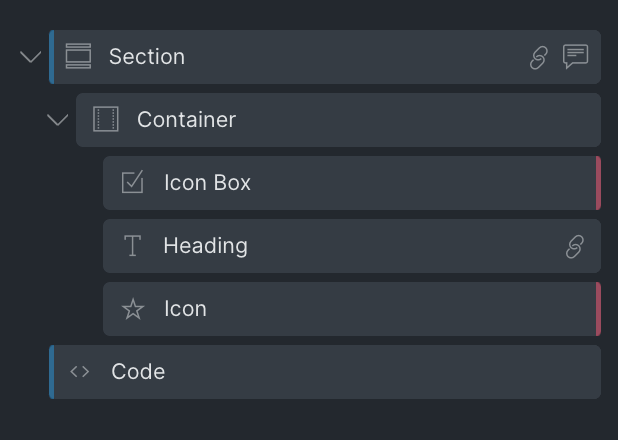
Need an easy way to identify which elements are wrapped in a link within your Structure Panel? This feature adds a small icon next to all elements enclosed in a link, making them instantly recognizable.
Release 2.8.1
August 28, 2024
14 changes
This release brings several enhancements to existing AT functions (Plain classes, Hide inactive Style accordion panel, Structure Helper, etc…), fixes a couple of bugs appeared recently, deprecates the Resizable Structure Panel tweak and the Parent Element Shortcut, and finally introduces new Link indicators inside the Structure Panel. Check it out!
NEW
Link indicator inside the Structure Panel
FIX
DEPRECATED: Parent Element Shortcut (introduced in Bricks 1.10.2)
Bricks 1.10.2 introduced the new element breadcrumb feature which can safely replace the parent element shortcut by AT, thus this builder tweak has been deprecated.
FIX
DEPRECATED: Resizable Structure Panel (introduced in Bricks 1.10.2)
This feature has been introduced natively in Bricks 1.10.2 and thus has been deprecated in AT.
FIX
Auto-expanding the left panel inside the CSS tab wasn’t working correctly
When clicking on the CSS tab of an element, the auto-expanding setting from Bricks could not be respected when SuperPowerCSS was activated.
FIX
Importing clamp() variables with nested calc() functions would generate a JS error
Nested calc() functions inside a clamp() function could create a JS error when importing CSS variables inside the variable manager.
FIX
Bricks suggestion dropdown was hidden when the “Suggestions Dropdown for CSS Variables” was enabled
In some edge cases, the 'Suggestions Dropdown for CSS Variables' builder tweak could hide the Bricks suggestion dropdown too aggressively. It now hides the core dropdown only when the corresponding text input is focused.
FIX
“Hide inactive Style accordion panel” could potentially hide content groups if some style groups were active
In some rare cases, the control groups located inside the content tab may become hidden. This issue should be fixed.
FIX
“Hide inactive Style accordion panel” is now compatible with BricksExtras and BricksForge
The control groups added by both BricksExtras and BricksForge (such as "Interactive", "Tooltips", "Animations", etc..) weren't compatible with the "Hide inactive Style accordion panel" builder tweak. Now they should be highlighted just like the Core control groups.
FIX
The import CSS Variables function could generate long decimal values for clamps.
When importing CSS clamp variables inside the variable manager, the conversion script could generate several "useless" decimals. Now the script parse the result and limits the output to two decimals
FIX
Added “Uncategorized” to the filter options of the groups inside the class manager > bulk actions
You can now filter the global classes that don't have any category assigned inside the class manager > bulk actions.
FIX
Added “Elements with at least one global class that contains Custom CSS” filter inside the Structure Helper Modal
A new filter has been added to the Structure Helper modal that allows you to quickly highlight the elements that contain global classes with custom CSS applied to them.